Strats Documentation
Everything about how the terminal works — from first sign-in to syndicate execution.
What is Strats
Strats is a multi-chain trading terminal built around two ideas: fast solo execution with MEV protection, and syndicates — group buys where multiple wallets pool ETH, buy together and share the outcome under transparent, on-chain rules.
Market data comes from DexScreener paired with Strats's own on-chain scans; charts are DexScreener's live candles wrapped in Strats's own transaction feed; execution goes through Strats's router contracts, which forward to Uniswap (or PancakeSwap on BNB Chain) and take a protocol fee of 1%.
Getting started
1 · Sign in
Hit Connect in the header. Strats uses Privy for identity — sign in with Google, Twitter/X, Discord or email. No browser wallet or seed phrase is needed to get started.
2 · Create a trading wallet
In Settings, create (or import) a trading wallet. Keys are encrypted and held server-side, which is what makes one-click execution and multi-wallet trading possible. You can run several wallets and mark one as default.
3 · Fund it
Send ETH (or BNB, on BNB Chain) to your trading wallet address — it's the same address on every EVM network. Your gas balance shows in the header for whichever network is selected.
4 · Pick a username
You'll be prompted for an alias on first sign-in. It's what appears on leaderboards, syndicate rosters and the platform trade feed.
Networks
The network selector lives in the header, next to your balance. Switching networks re-scopes everything: token search, trending, charts, balances and explorer links.
| Network | Chain ID | Gas | DEX | Explorer |
|---|---|---|---|---|
| Ethereum | 1 | ETH | Uniswap V2/V3 | Etherscan |
| Robinhood Chain | 4663 | ETH | Uniswap V3 | Blockscout |
| BNB Chain | 56 | BNB | PancakeSwap V2/V3 | BscScan |
Charts and market data are always live on every network. Trade execution on a network lights up once the Strats router contract is deployed there — until then the order form shows a “trading soon” notice for that chain. Robinhood Chain is an Arbitrum Orbit L2 that settles on Ethereum and uses ETH for gas; its sequencer has no public mempool, so sandwich-style MEV isn't a factor there.
The Terminal
Trending sources
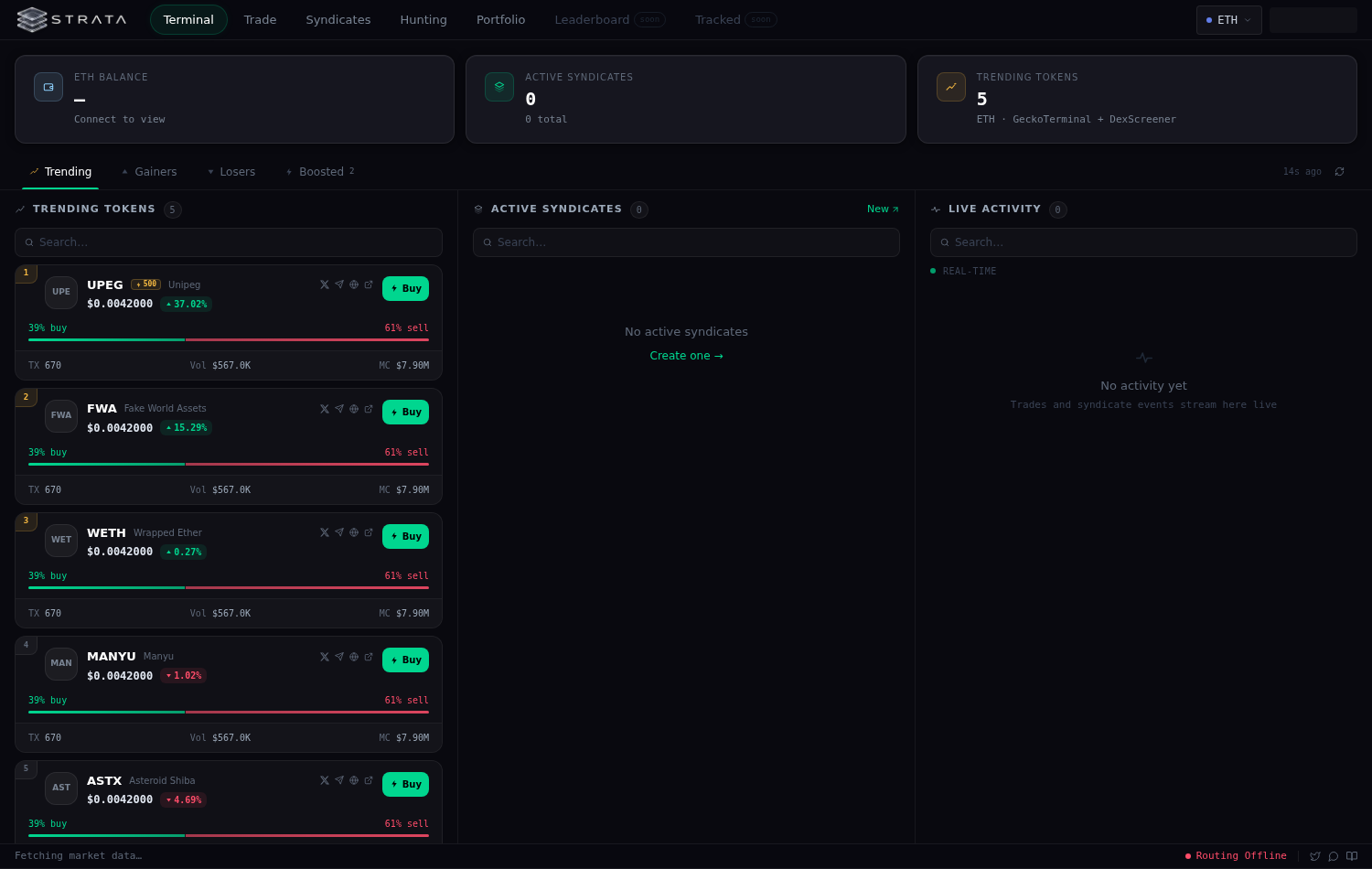
The Trending / Gainers / Losers tabs are built from the chain itself: Strats scans recent swap events to find the pools actually trading right now, prices them through DexScreener, and filters through liquidity, volume and buy-count floors so dust and honeypot bait don't make the list. Each token carries DexScreener icons, X/Telegram/website links, and a direct DexScreener link.
The Boosted tab is DexScreener-sourced: tokens whose communities are actively paying for DexScreener boosts, ranked by total boost spend (the amber ⚡ n chip). Boosts are promotion, not endorsement — a boost chip on a trending card just tells you someone is spending to be seen.
Reading a token card
Rank badge (top-3 in amber) · symbol and boost chip · social links · price with 24h delta · buy/sell pressure bar (green vs red share of the day's transactions) · TX count, volume and market cap. Clicking anywhere opens the token in the Trade view; the Buy button does the same.
Syndicates & Live Activity columns
Active syndicates you can join sit in the middle column with their raised totals. The right column is the platform-wide activity feed — syndicate creations, joins, buys, sells and closes as they happen.
Trading
Finding a token
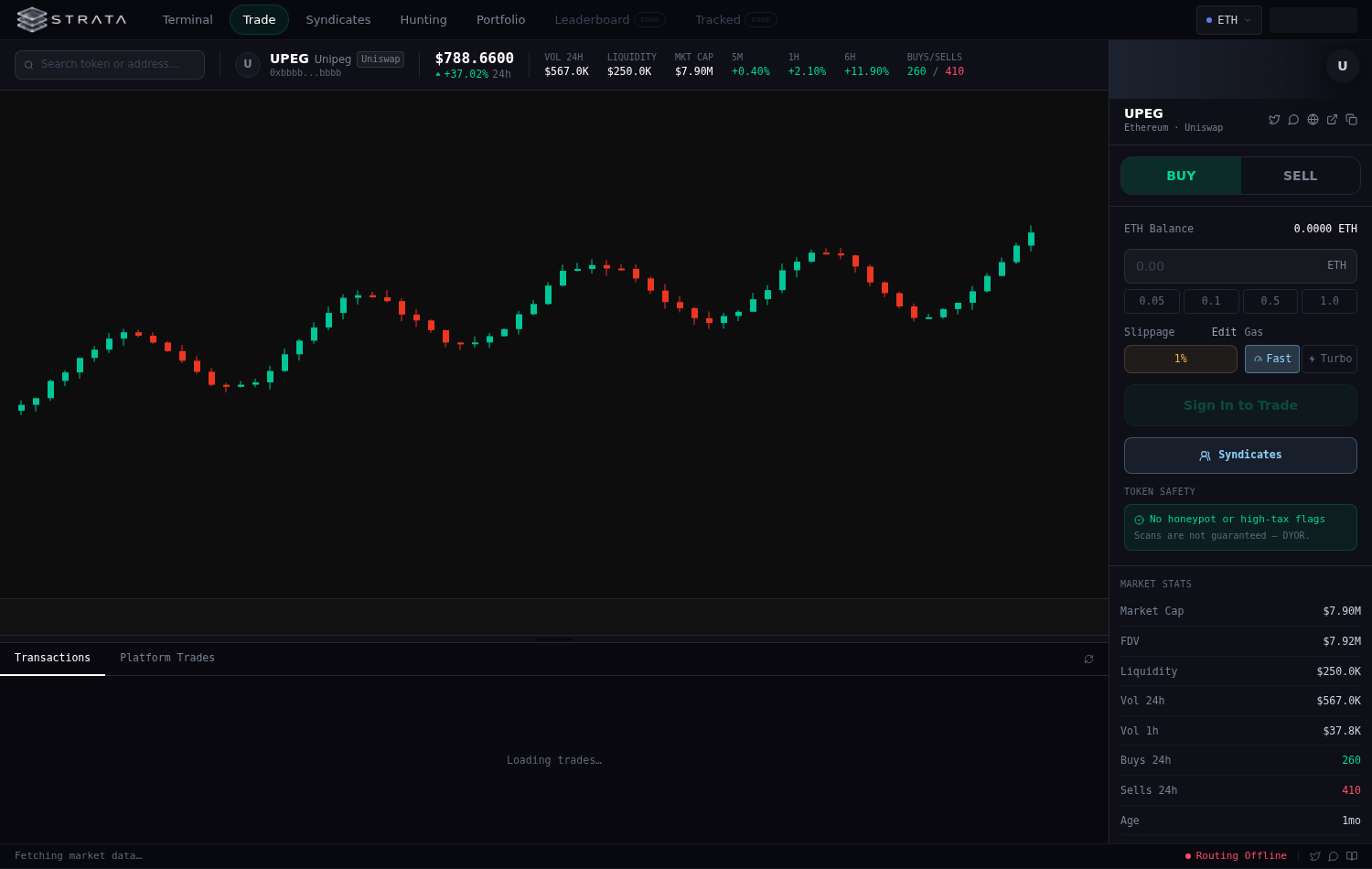
Search by name, symbol or contract address — results are scoped to the selected network and sorted by liquidity. Deep links work too: /trade?token=0x… loads the deepest pool for that token and will switch networks automatically if the token only trades elsewhere.
The chart
Charts are DexScreener's live TradingView-style candles, re-tinted to Strats's palette and framed by a Strats baseboard. The transaction list below the chart is Strats's own: seeded from recent trade history and, on Ethereum, streamed live over an Alchemy websocket — new swaps flash in the instant they confirm. Drag the divider between chart and transactions to resize.
The wallet filter (funnel icon on any row) narrows the feed to one wallet. Once filtered, the crosshair toggle in the filter chip marks that wallet's buys and sells directly on the chart — useful for following a whale's entries and exits. Applying chart markers reloads the chart once.
Placing a trade
Pick Buy or Sell, enter an amount (quick-fill chips for common sizes, percent chips when selling), set slippage, choose a gas mode and execute. The quote panel shows the minimum you'll receive after slippage — quotes are read on-chain from the network's router and already account for the 1% protocol fee.
On Ethereum, orders route through MEV-protected RPCs first (Flashbots private bundles, then MEV Blocker) so trades never sit exposed in the public mempool. After a buy confirms, Strats pre-approves the token in the background so your eventual sell needs no approval wait.
Token safety
Every selected token is auto-scanned: simulated buy/sell taxes and honeypot heuristics, with clear flags when something smells. Scans are a guardrail, not a guarantee — always DYOR.
Market stats
The stats panel reads DexScreener's figures directly (the same source as the chart, so numbers always agree), falling back to FDV where market cap is missing, and re-syncs every 30 seconds.
Multi-wallet
The Multi button next to Execute fires the same trade from up to ten of your trading wallets at once — each with its own amount, each an independent transaction, so one failure never blocks the rest. Wallet/amount combinations can be saved as presets and replayed with one click. Sell mode shows each wallet's live token balance.
Syndicates & modes
A syndicate is a group buy with on-chain rules: members contribute ETH into the syndicate contract, the pool buys a target token, and proceeds flow back to members pro-rata when the position is closed. Who gets to pull the trigger is decided by the syndicate's mode, chosen at creation:
Lifecycle
Create (pick token, mode, parameters) → Fund (members join and contribute ETH) → Execute (buy per the mode's rules; entry recorded on the activity feed and chart) → Manage (sell partially or fully; Council modes vote each action) → Close (remaining ETH distributed pro-rata; results feed the leaderboard and each member's P&L).
Syndicate trades appear on the token's chart as platform trade markers, so you can see exactly where a syndicate entered and exited relative to price. Syndicates run per-network — the header selector scopes the list, and a syndicate always trades on the chain it was created on.
Fees & security
- Protocol fee: 1% of trade value, taken by the Strats router before the swap (capped on-chain at 5%; the current rate is public state on the contract).
- DEX fee: the pool's own fee (0.3% on Uniswap V2, tier-dependent on V3/Pancake V3) applies as on any DEX.
- MEV protection: Ethereum orders go through Flashbots / MEV Blocker private relays — no public-mempool exposure, no sandwiches.
- Slippage guard: every order carries a minimum-received bound; the server refuses zero-slippage-protection trades outright.
- Key custody: trading wallet keys are encrypted at rest server-side and only decrypted per-request under your authenticated session. Export your key anytime from Settings.
- Contracts: the router is non-custodial — it never holds balances between transactions, is pausable, and ownership transfers are two-step.
Other pages
- Hunting — discovery feed: new pools, boosted tokens and momentum plays in one stream.
- Portfolio — your holdings across trading wallets with live pricing and a value-over-time chart that builds as snapshots accrue.
- Settings — wallets (create / import / export / default), avatar and username.
- Leaderboard & Tracked — coming soon: trader rankings from closed syndicate P&L, and followed-wallet feeds.
Questions or something broken? Ping the team — and if you're self-hosting, the repository's README covers environment variables and per-chain deployment.